A Certificate of Analysis (COA) only proves something if it's authentic and pertains to the specific batch you have in your possession. Altered reports, borrowed from another seller, or reused from one batch to another are circulating. This guide demonstrates, using a genuine Janoshik Analytical Lab report, how to read and verify it yourself in minutes, without relying on the seller. MyPeptide included.
The essentials in 30 seconds
- Each Janoshik report has a unique 12-character key, printed at the bottom of the document.
- Enter the Task Number and this key on janoshik.com/verify (the lab's website, never a link provided by the vendor): the lab displays the full report as it issued it.
- Then compareeach field: client, sample, batch number, date, results. A single difference is enough to reject the document.
- Finally, check that the batch number in the report matches the one printed on your bottle.
Anatomy of a Janoshik Report
Real-life example: the report#241204, our Retatrutide 20 mg from the batchMP-777RT202, analyzed on October 14, 2026. The numbers refer to the explanations below.
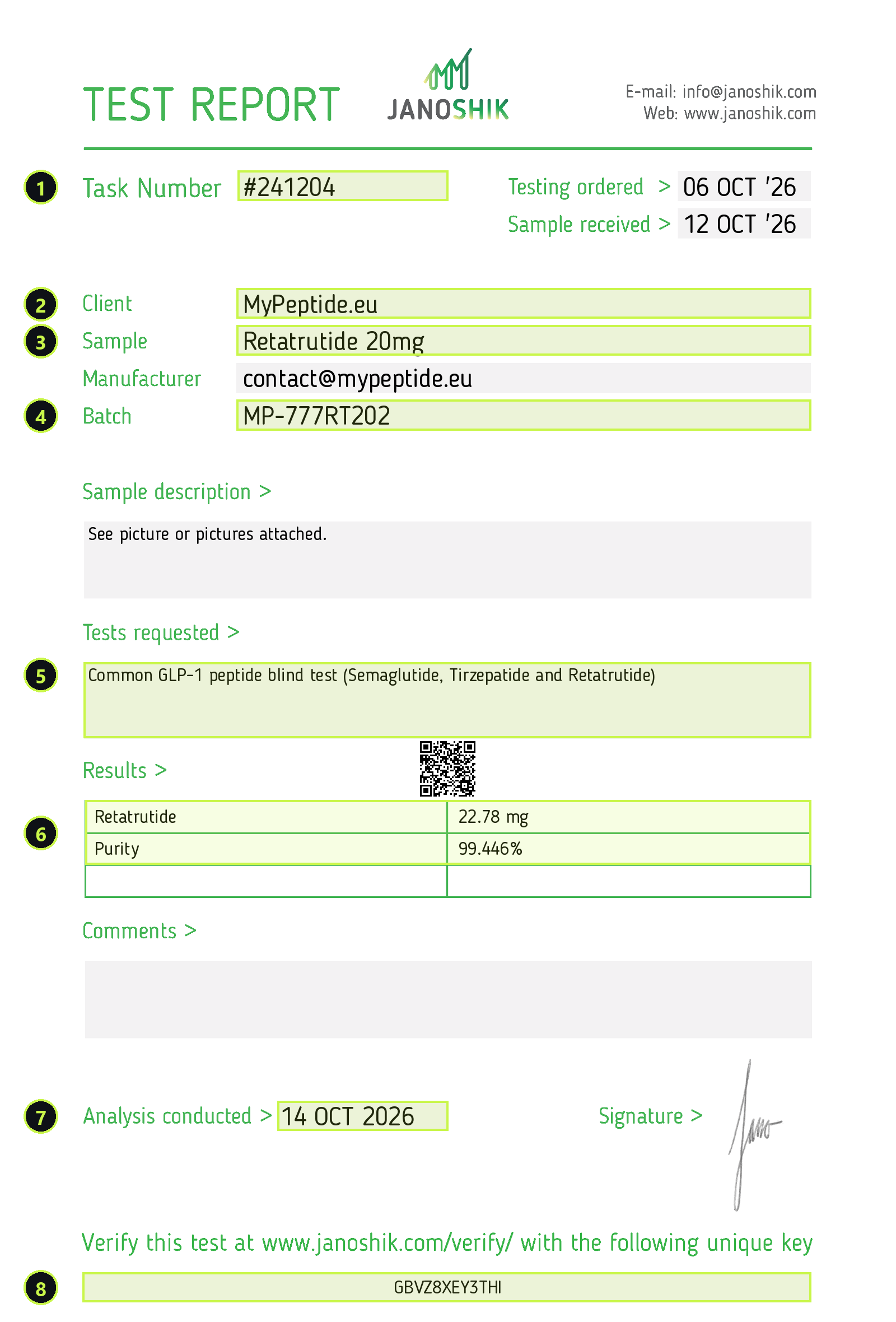
- Task Number: the analysis number at Janoshik (here #241204). It identifies the report and must be identical on the verification page.
- Customer: who ordered the analysis. It must correspond to the seller from whom you are buying. Beware of similar names: a report with the name "MyPeptide.eu" is not the same as one from another site with a similar name, and vice versa.
- SampleThe product and dosage as stated (here Retatrutide 20 mg) must correspond exactly to the bottle purchased.
- Batch: the lot number. This is the most important field: it links the report to your bottle. A report without a lot number proves nothing about the product you received.
- Tests requested: what was asked of the laboratory. Here, a "blind" test of common GLP-1 peptides: the laboratory itself identifies the molecule present among semaglutide, tirzepatide and retatrutide, which confirms the identity of the product and not just its purity.
- Results: the quantity measured in the vial (22.78 mg versus the stated 20 mg) and the HPLC purity (99.446%). Both matter: high purity with a quantity far below the label remains a problem.
- Analysis conductedThe date of the analysis must be consistent with the batch's production period. The same old report being presented for all batches is a warning sign.
- Verification key: 12 unique characters (here GBVZ8XEY3THI), to be entered on janoshik.com/verify along with the Task Number. This is what allows the document to be verified with the laboratory, without going through the seller.
Checking a report in 5 steps
1. Note the batch number on your bottle
It appears on the bottle label (at MyPeptide, in the formMP-777…or a 6-digit code for the first batches). Without this number, it is impossible to link a report to your product.
2. Find the report for this batch
The seller must publish the batch report, not a "standard" report. At MyPeptide, all reports are on the pageCertificates of analysis, filterable by product, with the original report to open or download.
3. Enter the task number and key on the lab website
Open janoshik.com/verify in your browser yourself (type the address, do not follow a link you received) and enter the two requested pieces of information: the Task Number (at the top of the report, here 241204) and the 12-character key printed at the bottom (here GBVZ8XEY3THI). The lab will then display the complete report exactly as it issued it. If the key is rejected, or if the website that opens is not janoshik.com, stop there.
4. Compare each field, one by one
Task number, client, sample, batch, date, quantity, purity: everything must bestrictly identicalbetween the seller's document and the one displayed by Janoshik. A retouch often involves a single figure (purity, quantity) or the customer's name.
5. Check consistency with your purchase
Is the batch number in the report the same as your bottle? Is the analyzed dosage the one you purchased (10 mg or 20 mg)? Is the date plausible for this batch? If the answer is no, the report, even if authentic, does not pertain to your product.
Warning signs
- No verification key, or a key that is masked, blurred, or cut off from the image.
- Customer different from seller: report commissioned by another site, resold with the product.
- No batch number, or a batch that doesn't correspond to anything on your bottle.
- One single report for all batches, often old.
- "Verification" link provided by the sellerto a domain other than janoshik.com.
- Purity alone, without quantitynor identification of the molecule.
- Document cropped or resampledto the point that the fields become unreadable.
What a report says, and what it doesn't say
It says: what molecule is present (if identification has been requested), in what quantity in the analyzed vial, and with what chromatographic purity (HPLC) on the date of analysis.
It does not say:Unless these tests have been requested and are listed under "Tests requested": sterility, endotoxin levels, presence of heavy metals or residual solvents. It also does not guarantee the preservation of the product after analysis (storage chain, temperature).
A measured quantity slightly above the label (for example, 22.78 mg for 20 mg) is common: manufacturers fill in a little more to compensate for losses. However, a significantly lower quantity should raise a red flag.
Frequently Asked Questions
How to verify a Janoshik certificate?
Open janoshik.com/verify in your browser and enter the Task Number and the unique 12-character key printed at the bottom of the report. The lab will display the complete report it issued: compare each field (Task Number, Customer, Sample, Lot, Date, Quantity, Purity) with the vendor's document, and then verify that the lot matches your bottle.
Where is the verification key on a Janoshik report?
At the very bottom of the document, under the phrase "Verify this test at www.janoshik.com/verify/ with the following unique key", it contains 12 characters, letters and numbers.
Does an authentic report guarantee my bottle?
Only if the batch number on the report matches the one printed on your bottle and the product and dosage correspond. A genuine report from a different batch, dosage, or vendor says nothing about your product.
What is the difference between purity and quantity?
HPLC purity indicates the proportion of the target molecule among what is detected (for example, 99.446%). Quantity indicates how many milligrams the bottle actually contains. Both are necessary: a very pure but under-dosed product, or one with the correct dosage but impure, will not match the label.
Where can I find the MyPeptide batch reports?
On the mypeptide.eu Certificates of Analysis page: each original Janoshik report is published there with its batch number, date of analysis, results and verification key, including the worst results.
Research use only.MyPeptide products are intended exclusively for scientific laboratory research. Janoshik Analytical is an independent laboratory, commissioned and paid by MyPeptide for each analysis.